| Click on the Icon on the Top Left of the screen, in the action menu that drops down select Payment Settings | 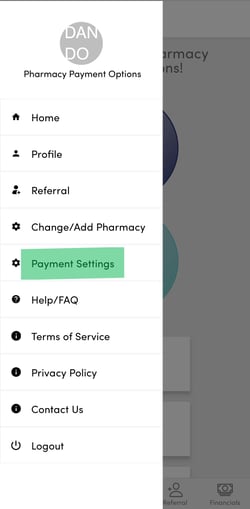 |
| Select the location you want to configure payments for | 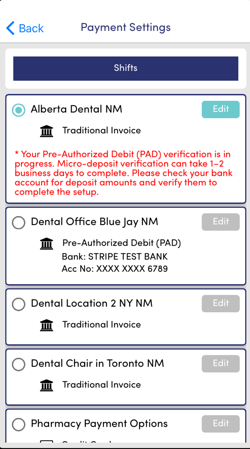 |
| Select Pre-Authorized Debit (PAD) | 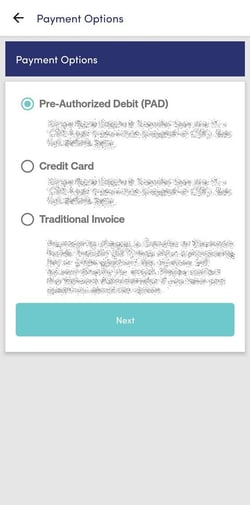 |
|
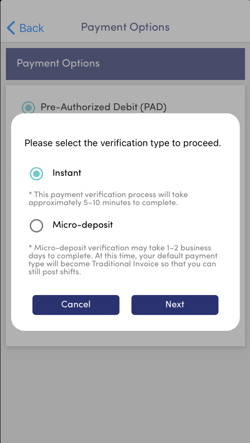
If you select Instant follow the on screen instructions and ensure you allocate about 5 to 10 minutes for the verification process as required by your bank |
 |
|
If you have any issues with the Instant Process or do not see your bank listed, then we recommend using the Micro-Deposit Process. Continue reading if you select the Micro-Deposit Method |
|
|
Follow the on screen prompts for your banking details collected by Stripe, our 3rd party secure banking provider, and press the Submit button |
.png?width=250&height=451&name=RB%20Owner%20PAD%20Payment%20Setup%204%20(Micro%20Deposit).png) |
|
Press Confirm to move to next step Please ensure you look for an email from "support@stripe.com" regarding confirmation of next steps and when the micro deposits have been made
You will need to follow the links found in the email from "support@stripe.com" in order to complete the account verification |
.png?width=250&height=454&name=RB%20Owner%20PAD%20Payment%20Setup%205%20(Micro%20Deposit).png) |
|
Strip PAD Agreement acceptance, press Accept to move to next step |
.png?width=250&height=443&name=RB%20Owner%20PAD%20Payment%20Setup%206%20(Micro%20Deposit).png) |
|
Please check your owner account email for your instructions from support@stripe.com and the next steps
Important Note: It may take 1-2 business days before the Micro Deposits from Stripe are pushed into your account. Please check your email for a message from support@stripe.com as they will confirm directly with you when the deposits have been made and provide a link to confirm next steps.
Once that is complete, Relief Buddy will automatically update your payment settings on the platform. |
.png?width=250&height=443&name=RB%20Owner%20PAD%20Payment%20Setup%207%20(Micro%20Deposit).png) |
English
![2 Relief Buddy Logo Final, RB and Text, Horizontal-1.png]](https://knowledgebase.reliefbuddy.com/hs-fs/hubfs/2%20%20Relief%20Buddy%20Logo%20Final%2c%20RB%20and%20Text%2c%20Horizontal-1.png?height=40&name=2%20%20Relief%20Buddy%20Logo%20Final%2c%20RB%20and%20Text%2c%20Horizontal-1.png)