![2 Relief Buddy Logo Final, RB and Text, Horizontal-1.png]](https://knowledgebase.reliefbuddy.com/hs-fs/hubfs/2%20%20Relief%20Buddy%20Logo%20Final%2c%20RB%20and%20Text%2c%20Horizontal-1.png?height=40&name=2%20%20Relief%20Buddy%20Logo%20Final%2c%20RB%20and%20Text%2c%20Horizontal-1.png)
Weekly Availability (Available Days to Work)
Overview
The Weekly Availability feature lets you choose which days of the week you’re generally available to work.
This helps ensure you only see and receive notifications for shifts that match your preferred work days.
By setting your Weekly Availability, Relief Buddy can better tailor shift notifications and search results to your schedule.
What Is Weekly Availability?
Weekly Availability allows you to select the days of the week you want to work (for example, Mondays and Thursdays).
Once set:
-
You’ll only receive notifications (push and email) for shifts on your selected days
-
You’ll only see shifts on those days in the Shift Search page
-
Shifts on other days will be automatically hidden
This feature is designed to reduce unnecessary notifications and help you focus on shifts that fit your routine.
How Weekly Availability Works with Unavailable Dates
Weekly Availability works alongside your existing Unavailable Dates:
-
Weekly Availability = your general, recurring schedule
-
Unavailable Dates = specific days you can’t work (such as vacations or appointments)
If you’ve marked a specific date as unavailable, you will not see or be notified about shifts on that date — even if it falls on a day you usually work.
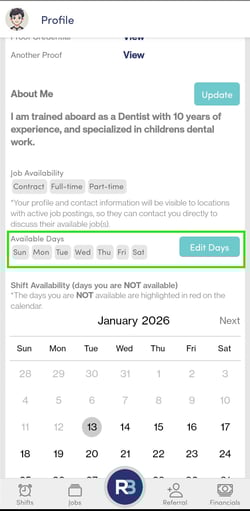
Open the Relief Buddy app
Go to your Profile
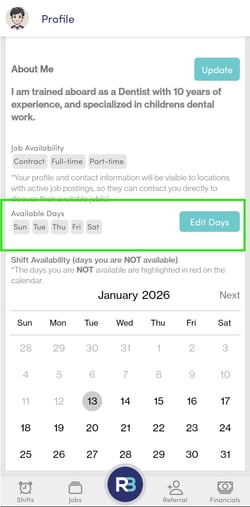
Under Job Availability, select Availability
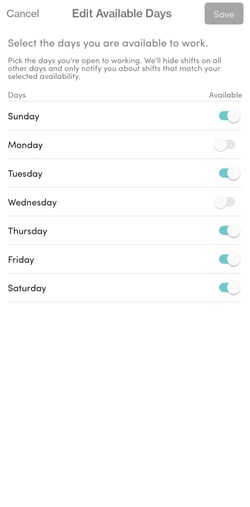
Toggle on the days you’re available to work
Toggle off the week days you are unavailable
Tap Save
Important Notes
-
Weekly Availability affects:
-
Shift notifications
-
Shift Search results
-
-
This setting does not change or override:
-
Your existing Shift Availability settings
-
Any specific Unavailable Dates you’ve added
-
-
You can update your Weekly Availability at any time
Why Use Weekly Availability?
-
Fewer irrelevant notifications
-
Cleaner, more relevant shift search results
-
Better alignment between your schedule and available shifts
Have a specific date you need to block off check out this article: